Jirion - A Simple Jira Desktop Client for Windows
Latest version: v1.0.26.11160
Jira is huge. Jirion is the part you use every day.
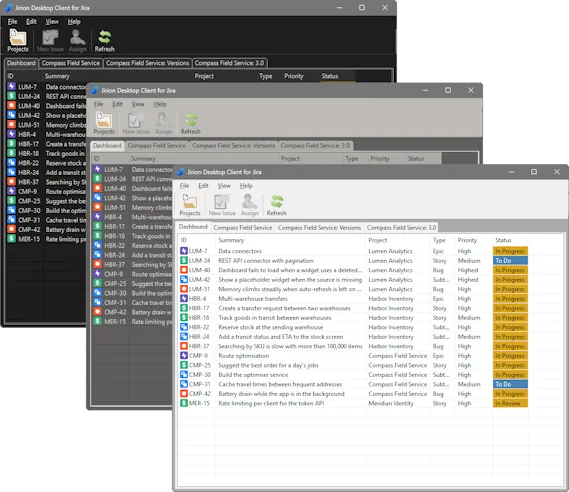
Jirion is a Windows desktop app for Jira Cloud. Sign in once and you see every issue assigned to you, across every project, on a single dashboard. Open any project in its own tab. Change an issue's status, priority or assignee, add a comment, or move a whole selection of issues on in one go - all without a browser tab in sight.
It is deliberately small. It does the everyday things quickly and clearly, rather than trying to be all of Jira.
What you get
Everything assigned to you
The Dashboard lists every open issue assigned to you, from every project, in the same rank order you see in Jira. It is the first thing you see after signing in.
A tab for each project
Open as many projects as you like and switch between them like browser tabs. Sort by any column, and hide finished issues when you want a shorter list.
Change things where you see them
Right-click an issue to assign it or change its status or priority. Select several issues and change them all at once.
Rich text that stays rich
Descriptions and comments open in a built-in editor with headings, lists, code blocks and links, and are saved back to Jira as properly formatted text.
Stays up to date
Jirion checks Jira regularly and updates your lists and open issues when colleagues make changes, without reloading the list or losing your place.
Versions and releases
Create, edit and release a project's versions, see which issues are on each one, and set an issue's fix versions from its window.
Who it's for
- People who spend the day working through issues assigned to them and would like fewer browser tabs
- Developers and testers who change statuses and add comments many times a day
- Team leads who tidy up many issues at once - reassigning, reprioritising, moving them on
- Anyone who looks after versions and releases in Jira
Built for Jira Cloud
Jirion works with Jira Cloud sites (the yourcompany.atlassian.net kind). It signs in with your
Atlassian account email address and an API token that you create yourself - never your password. If you choose
to stay signed in, the token is saved encrypted, for your Windows account only.
Jirion talks straight to your Jira site; your issues do not pass through ANB Software. (Checking your licence and looking for updates do contact our website.) Jira Server and Jira Data Center are not supported.
New to Jirion? Getting Started takes you from download to your first dashboard in a few minutes.
Need a hand? Getting Started · Support · Report a bug · Give feedback · Donate
Jirion is an independent product of ANB Software Ltd. It is not affiliated with, endorsed by or sponsored by Atlassian. Jira and Atlassian are trademarks of Atlassian Pty Ltd.